laravel-filament-activity-log maintained by bestora
Laravel Filament Activity Log
Fork of Rômulo Ramos Activitylog
Spatie Laravel Activity Log for Filament




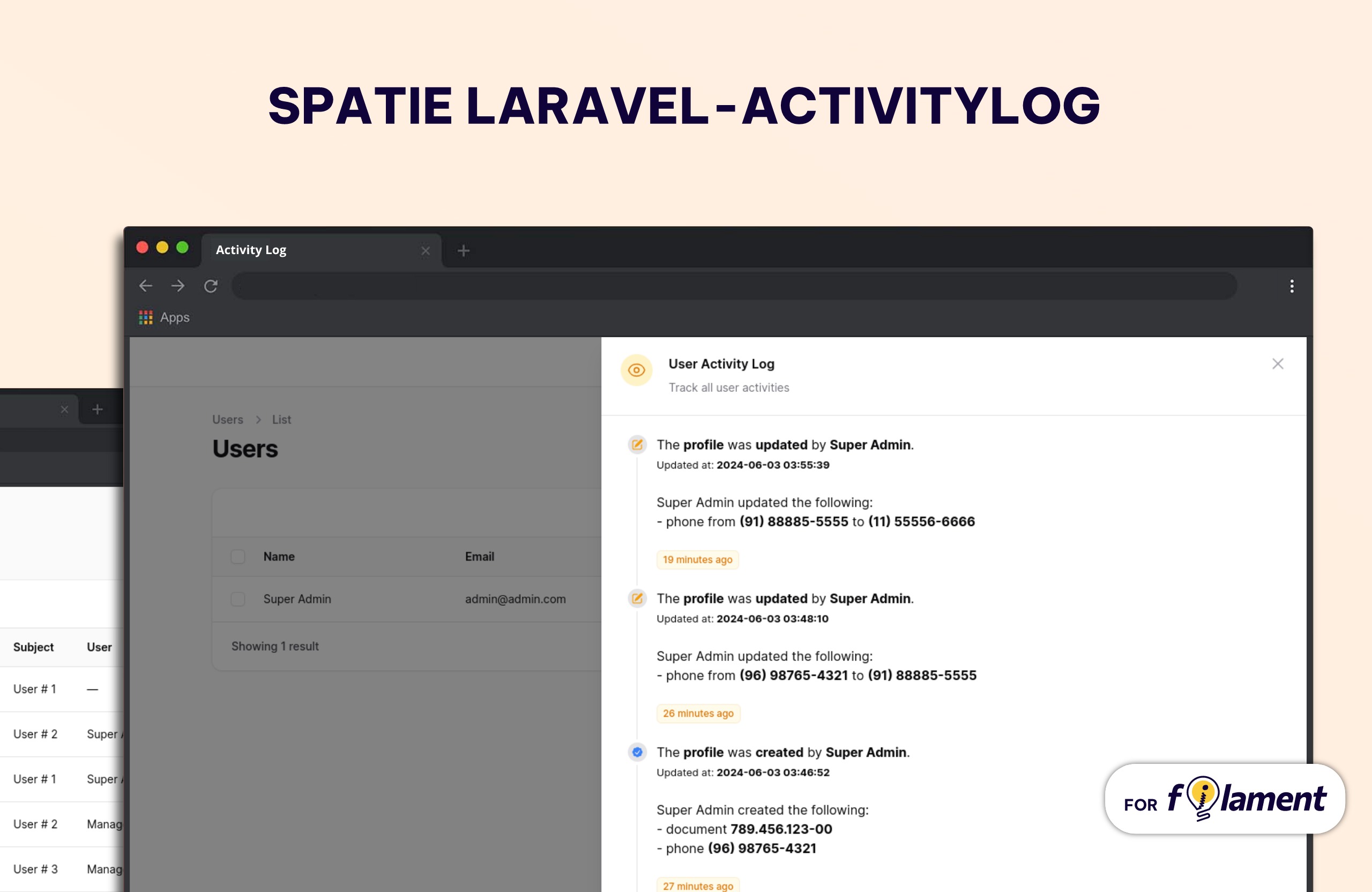
This package provides a Filament resource that shows you all of the activity logs and detailed view of each log created using the spatie/laravel-activitylog package. It also provides a relationship manager for related models.
Requirements
- PHP ^8.4
- Laravel ^11.0 | ^12.0 | ^13.0
- Filament ^5.6
- Spatie Laravel Activity Log ^5.0
Languages Supported
ActivityLog Plugin is translated for :
- 🇧🇷 Brazilian Portuguese
- 🇺🇸 English
- 🇩🇪 German
- 🇪🇸 Spanish
- 🇫🇷 French
- 🇮🇷 Persian
- 🇦🇪 Arabic
- 🇵🇹 Portuguese
- 🇮🇱 Hebrew
- 🇳🇱 Dutch
- 🇱🇻 Latvian
Installation
You can install the package via composer:
composer require bestora/laravel-filament-activity-log
After that run the install command:
php artisan activitylog:install
This will publish the config & migrations from spatie/laravel-activitylog
And run migrates
php artisan migrate
You can manually publish the configuration file with:
php artisan vendor:publish --tag="activitylog-config"
This is the contents of the published config file:
return [
    'resources' => [
       'label'                     => 'Activity Log',
        'plural_label'              => 'Activity Logs',
        'hide_restore_action'       => false,
        'restore_action_label'      => 'Restore',
        'hide_resource_action'      => false,
        'hide_restore_model_action' => true,
        'resource_action_label'     => 'View',
        'navigation_item'           => true,
        'navigation_group'          => null,
        'navigation_icon'           => 'heroicon-o-shield-check',
        'navigation_sort'           => null,
        'default_sort_column'       => 'id',
        'default_sort_direction'    => 'desc',
        'navigation_count_badge'    => false,
        'resource'                  => \Bestora\FilamentActivityLog\Resources\ActivitylogResource\ActivitylogResource::class,
    ],
    'date_format'     => 'd/m/Y',
    'datetime_format' => 'd/m/Y H:i:s',
];
Optionally, you can publish the views using
php artisan vendor:publish --tag="activitylog-views"
Usage
Basic Spatie ActivityLog usage
In you Model add Spatie\Activitylog\Traits\LogsActivity trait, and configure getActivitylogOption function
For more configuration, Please review Spatie Docs
use Illuminate\Database\Eloquent\Model;
use Spatie\Activitylog\Traits\LogsActivity;
use Spatie\Activitylog\LogOptions;

class NewsItem extends Model
{
    use LogsActivity;

    protected $fillable = ['name', 'text'];

    public function getActivitylogOptions(): LogOptions
    {
        return LogOptions::defaults()
        ->logOnly(['name', 'text']);
    }
}
Plugin usage
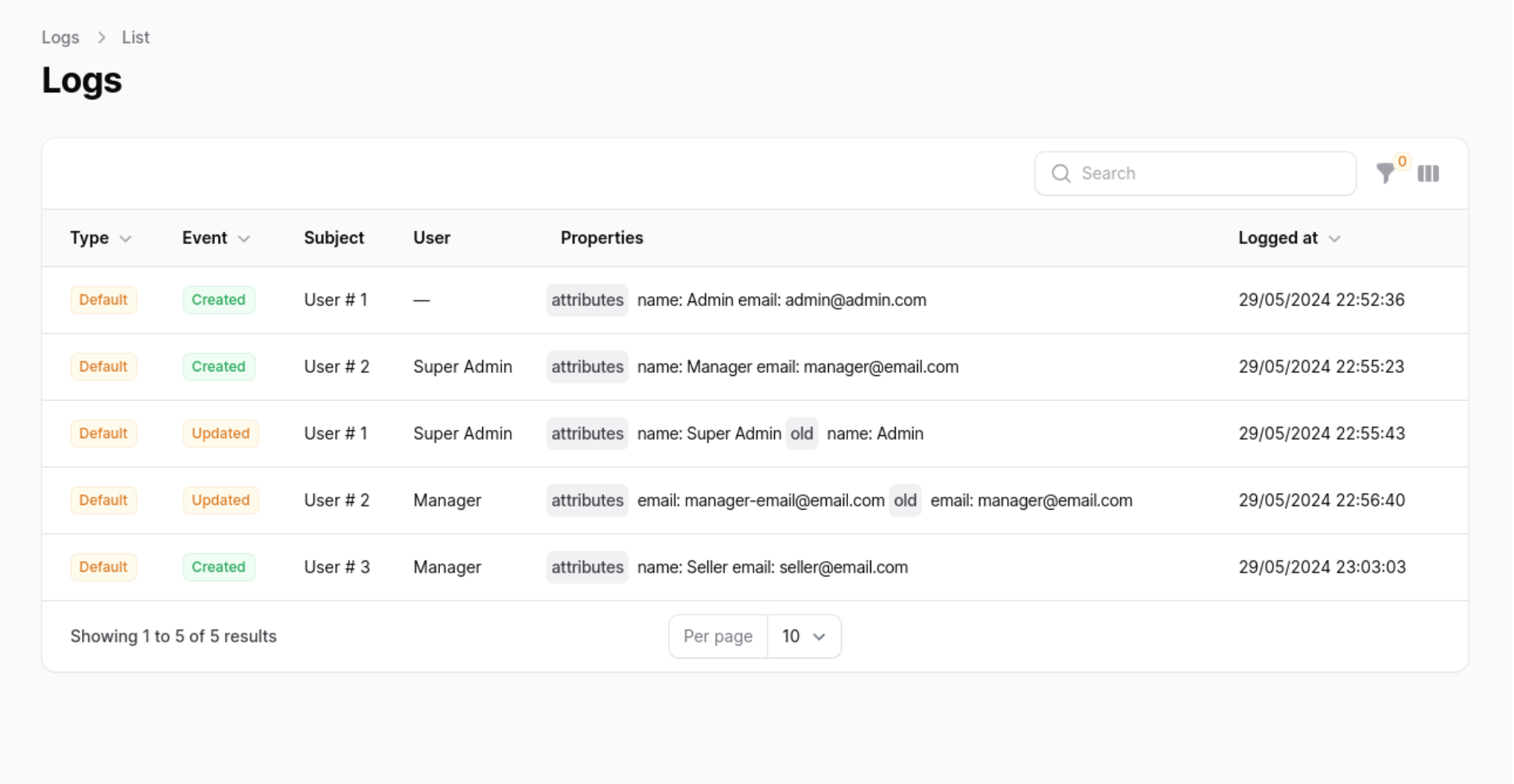
In your Panel ServiceProvider (App\Providers\Filament) active the plugin
Add the Bestora\FilamentActivityLog\ActivitylogPlugin to your panel config
use Bestora\FilamentActivityLog\ActivitylogPlugin;

public function panel(Panel $panel): Panel
{
    return $panel
        ->plugins([
            ActivitylogPlugin::make(),
        ]);
}
Customising the ActivitylogResource
You can swap out the ActivitylogResource used by updating the ->resource() value. Use this to create your own CustomResource class and extend the original at \Bestora\FilamentActivityLog\Resources\ActivitylogResource\ActivitylogResource::class. This will allow you to customise everything such as the views, table, form and permissions.
[!NOTE] If you wish to change the resource on List and View page be sure to replace the
getPagesmethod on the new resource and create your own version of theListPageandViewPageclasses to reference the customCustomResource.
use Bestora\FilamentActivityLog\ActivitylogPlugin;

public function panel(Panel $panel): Panel
{
    return $panel
        ->plugins([
            ActivitylogPlugin::make()
                ->resource(\Path\For\Your\CustomResource::class),
        ]);
}
Customising label Resource
You can swap out the Resource label used by updating the ->label() and ->pluralLabel() value.
use Bestora\FilamentActivityLog\ActivitylogPlugin;

public function panel(Panel $panel): Panel
{
    return $panel
        ->plugins([
            ActivitylogPlugin::make()
                ->label('Log')
                ->pluralLabel('Logs'),
        ]);
}
Displaying the resource in the navigation
You can enable or disable the Resource navigation item by updating the ->navigationItem() value.
use Bestora\FilamentActivityLog\ActivitylogPlugin;

public function panel(Panel $panel): Panel
{
    return $panel
        ->plugins([
            ActivitylogPlugin::make()
                ->navigationItem(false), // by default is true
        ]);
}
Grouping resource navigation items
You can add a Resource navigation group updating the ->navigationGroup() value.
use Bestora\FilamentActivityLog\ActivitylogPlugin;

public function panel(Panel $panel): Panel
{
    return $panel
        ->plugins([
            ActivitylogPlugin::make()
                ->navigationGroup('Activity Log'),
        ]);
}
Customising a resource navigation icon
You can swap out the Resource navigation icon used by updating the ->navigationIcon() value.
use Bestora\FilamentActivityLog\ActivitylogPlugin;

public function panel(Panel $panel): Panel
{
    return $panel
        ->plugins([
            ActivitylogPlugin::make()
                ->navigationIcon('heroicon-o-shield-check'),
        ]);
}
Active a count badge
You can active Count Badge updating the ->navigationCountBadge() value.
use Bestora\FilamentActivityLog\ActivitylogPlugin;

public function panel(Panel $panel): Panel
{
    return $panel
        ->plugins([
            ActivitylogPlugin::make()
                ->navigationCountBadge(true),
        ]);
}
Set navigation sort
You can set the Resource navigation sort used by updating the ->navigationSort() value.
use Bestora\FilamentActivityLog\ActivitylogPlugin;

public function panel(Panel $panel): Panel
{
    return $panel
        ->plugins([
            ActivitylogPlugin::make()
                ->navigationSort(3),
        ]);
}
Authorization
If you would like to prevent certain users from accessing the logs resource, you should add a authorize callback in the ActivitylogPlugin chain.
use Bestora\FilamentActivityLog\ActivitylogPlugin;

public function panel(Panel $panel): Panel
{
    return $panel
        ->plugins([
            ActivitylogPlugin::make()
                ->authorize(
                    fn () => auth()->user()->id === 1
                ),
        ]);
}
Translate Resource Names
To translate resource names in the activity log, add a translateSubject callback within the ActivitylogPlugin chain
use Bestora\FilamentActivityLog\ActivitylogPlugin;

public function panel(Panel $panel): Panel
{
    return $panel
        ->plugins([
            ActivitylogPlugin::make()
                ->translateSubject(fn($label) => __("yourCustomLangFile.".$label)),
        ]);
}
Translate Activity log key Names
To translate the names of the keys in the activity log, add a translateLogKey callback within the ActivitylogPlugin chain
use Bestora\FilamentActivityLog\ActivitylogPlugin;

public function panel(Panel $panel): Panel
{
    return $panel
        ->plugins([
            ActivitylogPlugin::make()
                ->translateLogKey(fn($label) => __("yourCustomLangFile.".$label)),
        ]);
}
Customize Date Parsing
To customize how dates are parsed, depending on user preferences or settings:
use Bestora\FilamentActivityLog\ActivitylogPlugin;
use Morilog\Jalali\Jalalian;
use Carbon\Carbon;

public function panel(Panel $panel): Panel
{
    return $panel
        ->plugins([
            ActivitylogPlugin::make()
                ->dateParser(
                    fn($date) => auth()->user()->isJalaliCalendar() ?
                        Jalalian::fromDateTime($date) :
                        Carbon::parse($date)
                )
        ]);
}
Customize Date and DateTime Formats
To customize the format of dates and datetime columns based on user settings:
use Bestora\FilamentActivityLog\ActivitylogPlugin;

public function panel(Panel $panel): Panel
{
    return $panel
        ->plugins([
            ActivitylogPlugin::make()
                ->dateFormat('Y-m-d')
                ->datetimeFormat(fn() => auth()->user()->getFilamentDateTimeFormat())
        ]);
}
Customize DateTime Columns
To conditionally customize datetime columns in the UI, depending on the user's calendar preference:
use Bestora\FilamentActivityLog\ActivitylogPlugin;

public function panel(Panel $panel): Panel
{
    return $panel
        ->plugins([
            ActivitylogPlugin::make()
                ->customizeDatetimeColumn(function ($column) {
                    return $column->when(
                        auth()->user()->isJalaliCalendar(),
                        function ($column) {
                            return $column->jalaliDateTime();
                        }
                    );
                })
        ]);
}
Customize Date Picker Fields
To customize date picker fields in forms, depending on user preferences:
use Bestora\FilamentActivityLog\ActivitylogPlugin;

public function panel(Panel $panel): Panel
{
    return $panel
        ->plugins([
            ActivitylogPlugin::make()
                ->customizeDatePicker(function ($field) {
                    return $field->when(
                        auth()->user()->isJalaliCalendar(),
                        function ($field) {
                            return $field->jalali();
                        }
                    );
                })
        ]);
}
Manipulate View Action Using Custom Activity Resource Trait
Implement getFilamentActualResourceModel in the trait HasCustomActivityResource to determine the actual model related to the activity record for generating valid URLs.
use Bestora\FilamentActivityLog\Traits\HasCustomActivityResource;

trait HasCustomActivityResource
{
    public function getFilamentActualResourceModel($record)
    {
        $record = $record->subject->translatable;
        $model = null;

        switch ($record::class) {
            case FirstTranslatableModel::class:
                $model = $record->firstModel;
                break;

            case SecondTranslatableModel::class:
                $model = $record->secondModel;
                break;

            default:
                throw new Exception("Error Translatable subject model not found. record = ".$record::class, 1);
                break;
        }

        return $model;
    }
}
Hide Restore / View Action
To hide the restore / view action globally for a resource within the ActivitylogPlugin, you can use the isRestoreActionHidden and isResourceActionHidden method. these are particularly useful in scenarios where you do not want users to have the ability to restore or view entries from the activity log. you can also customize the label of view action:
use Bestora\FilamentActivityLog\ActivitylogPlugin;

public function panel(Panel $panel): Panel
{
    return $panel
        ->plugins([
            ActivitylogPlugin::make()
                ->isRestoreActionHidden(true)
                ->isResourceActionHidden(true)
                ->resourceActionLabel("Sample Label")
        ]);
}
Show Restore (Soft Deletes)
In the laravel-activitylog configuration file config/activitylog.php:
return [
    'subject_returns_soft_deleted_models' => true,
]
To globally display the restore (soft delete) action of a resource within the ActivitylogPlugin, you can use the isRestoreModelActionHidden method. This is particularly useful in scenarios where you do not want users to have the ability to restore activity log entries:
use Bestora\FilamentActivityLog\ActivitylogPlugin;

public function panel(Panel $panel): Panel
{
    return $panel
        ->plugins([
            ActivitylogPlugin::make()
                ->isRestoreModelActionHidden(false)
        ]);
}
Role Policy
To ensure ActivitylogResource access via RolePolicy you would need to add the following to your AppServiceProvider:
use App\Policies\ActivityPolicy;
use Illuminate\Support\Facades\Gate;
use Spatie\Activitylog\Models\Activity;

class AppServiceProvider extends ServiceProvider
{
    public function boot(): void
    {
        Gate::policy(Activity::class, ActivityPolicy::class);
    }
}
Full configuration
use Bestora\FilamentActivityLog\ActivitylogPlugin;

public function panel(Panel $panel): Panel
{
    return $panel
        ->plugins([
            ActivitylogPlugin::make()
                ->resource(\Path\For\Your\CustomResource::class)
                ->label('Log')
                ->pluralLabel('Logs')
                ->navigationItem(true)
                ->navigationGroup('Activity Log')
                ->navigationIcon('heroicon-o-shield-check')
                ->navigationCountBadge(true)
                ->navigationSort(2)
                ->authorize(
                    fn () => auth()->user()->id === 1
                )
                ->translateSubject(fn($label) => __("yourCustomLangFile.".$label)),
                ->dateParser(
                    fn($date) => auth()->user()->isJalaliCalendar() ?
                        Jalalian::fromDateTime($date) :
                        Carbon::parse($date)
                )
                ->dateFormat('Y-m-d')
                ->datetimeFormat(fn() => auth()->user()->getFilamentDateTimeFormat())
                ->customizeDatetimeColumn(function ($column) {
                    return $column->when(
                        auth()->user()->isJalaliCalendar(),
                        function ($column) {
                            return $column->jalaliDateTime();
                        }
                    );
                })
                ->customizeDatePicker(function ($field) {
                    return $field->when(
                        auth()->user()->isJalaliCalendar(),
                        function ($field) {
                            return $field->jalali();
                        }
                    );
                })
                ->isRestoreActionHidden(true)
                ->isResourceActionHidden(true)
                ->isRestoreModelActionHidden(false)
                ->resourceActionLabel("Sample Label"),
        ]);
}
Relationship manager
If you have a model that uses the Spatie\Activitylog\Traits\LogsActivity trait, you can add the Bestora\FilamentActivityLog\RelationManagers\ActivitylogRelationManager relationship manager to your Filament resource to display all of the activity logs that are performed on your model.
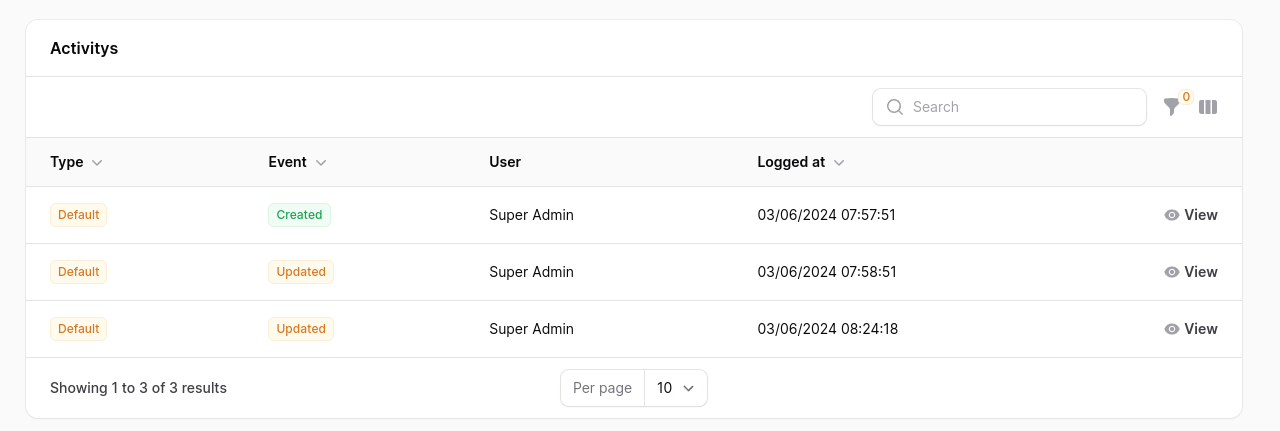
use Bestora\FilamentActivityLog\RelationManagers\ActivitylogRelationManager;

public static function getRelations(): array
{
    return [
        ActivitylogRelationManager::class,
    ];
}
Timeline Action
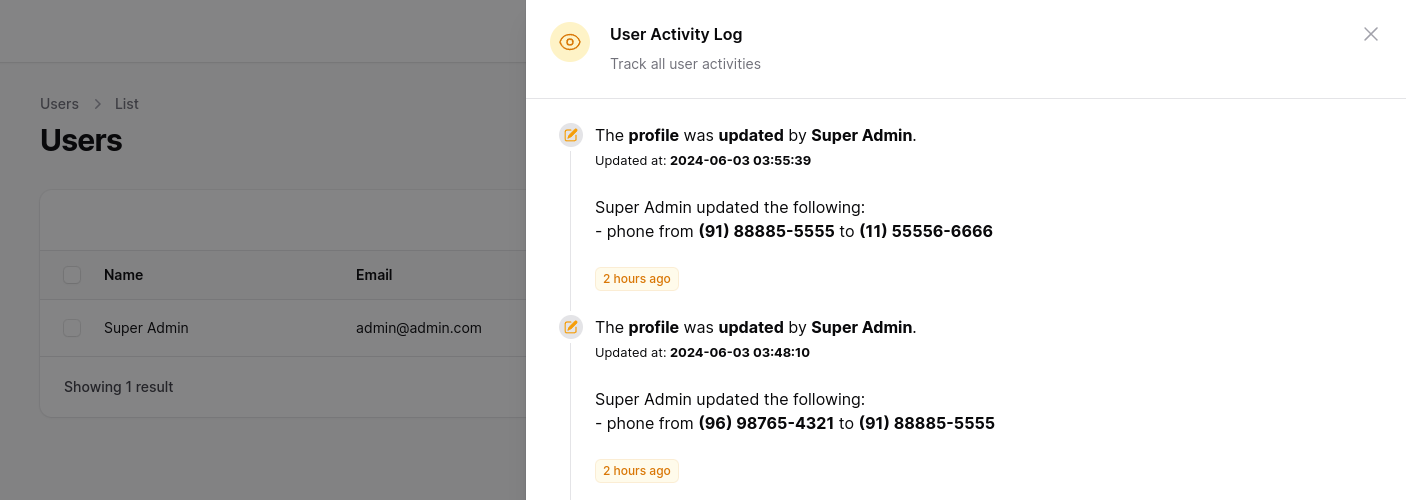
To make viewing activity logs easier, you can use a custom action. In your UserResource in the table function, add the ActivityLogTimelineTableAction.
use Bestora\FilamentActivityLog\Actions\ActivityLogTimelineTableAction;

public static function table(Table $table): Table
{
    return $table
        ->actions([
            ActivityLogTimelineTableAction::make('Activities'),
        ]);
}
you can pass a matrix with the relationships, remember to configure your Models.
public static function table(Table $table): Table
{
    return $table
        ->actions([
            ActivityLogTimelineTableAction::make('Activities')
                ->withRelations(['profile', 'address']), //opcional
        ]);
}
You can configure the icons and colors, by default the 'heroicon-m-check' icon and the 'primary' color are used.
use Bestora\FilamentActivityLog\Actions\ActivityLogTimelineTableAction;

public static function table(Table $table): Table
{
    return $table
        ->actions([
            ActivityLogTimelineTableAction::make('Activities')
                ->timelineIcons([
                    'created' => 'heroicon-m-check-badge',
                    'updated' => 'heroicon-m-pencil-square',
                ])
                ->timelineIconColors([
                    'created' => 'info',
                    'updated' => 'warning',
                ])
        ]);
}
You can limit the number of results in the query by passing a limit, by default the last 10 records are returned.
use Bestora\FilamentActivityLog\Actions\ActivityLogTimelineTableAction;

public static function table(Table $table): Table
{
    return $table
        ->actions([
            ActivityLogTimelineTableAction::make('Activities')
                ->limit(30),
        ]);
}
Full Timeline configuration
use Bestora\FilamentActivityLog\Actions\ActivityLogTimelineTableAction;

public static function table(Table $table): Table
{
    return $table
        ->actions([
            ActivityLogTimelineTableAction::make('Activities')
                ->withRelations(['profile', 'address'])
                ->timelineIcons([
                    'created' => 'heroicon-m-check-badge',
                    'updated' => 'heroicon-m-pencil-square',
                ])
                ->timelineIconColors([
                    'created' => 'info',
                    'updated' => 'warning',
                ])
                ->limit(10),
        ]);
}
Changelog
Please see CHANGELOG for more information on what has changed recently.
Contributing
Please see CONTRIBUTING for details.
Security Vulnerabilities
Please review our security policy on how to report security vulnerabilities.
Acknowledgements
Special acknowledgment goes to these remarkable tools and people (developers), the Activity Log plugin only exists due to the inspiration and at some point the use of these people's codes.
Credits
- Rômulo Ramos for the original Package
- TappNetwork for the Filament v4 PR
- Bestora
- opencode with Kimi K2.6
- All Contributors
License
The MIT License (MIT). Please see License File for more information.